
Building Maintenance App for UAE Property Owners | Missan Maintenance
2:34 · Captions on. Loads from YouTube only when you press play.
Teams in 3 countries · Serving clients across the Middle East, Europe, the US and Asia since 2004
Missan Maintenance · Building maintenance app · Built by Missan
A tap leaks. The tenant sends a WhatsApp message, then calls, then someone writes it on paper. Who has the job? When is the visit? Missan Maintenance puts every request in one app that carries your company name: tenants report in seconds, every job reaches the right team, and every step is on record.
Watch the film
0:07 Your brand · 0:18 ERP · 0:37 SMS registration · 1:10 Report · 1:21 Routing · 1:34 Assign, visit, fix · 1:48 Sign-off · 1:59 SLA · 2:12 Management view
2:34 · Captions on. Loads from YouTube only when you press play.
In under a minute
0:11 · Captions on. Loads from YouTube only when you press play.
0:33 · Captions on. Loads from YouTube only when you press play.
0:13 · Captions on. Loads from YouTube only when you press play.
0:14 · Captions on. Loads from YouTube only when you press play.
0:13 · Captions on. Loads from YouTube only when you press play.
0:11 · Captions on. Loads from YouTube only when you press play.
What Missan Maintenance does
One app for tenants, field teams, the office and management, in English and Arabic.
Your name, logo and colours on the phone app, the web app and the store listing.
Tenants, flats and buildings come from your property system automatically. No double entry; every sync is on record.
Tenants scan the building poster, enter their mobile and get an SMS code. They are matched to their flat from your ERP.
Sign in with an SMS code, Face ID or fingerprint, and stay signed in for 30 days.
A photo, a category and a voice note. English or Arabic.
Draw your areas on a map. Every building falls under its area and team, so each job reaches the right supervisor.
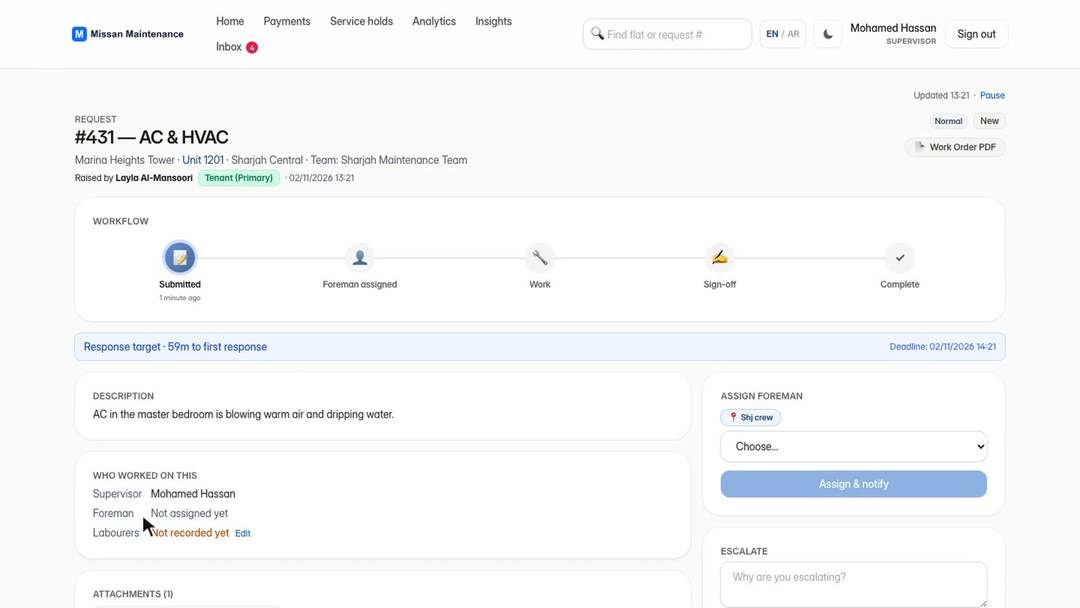
The supervisor assigns a foreman, who books the visit. Push notifications, before and after photos, store items, quotations and a printable work order.
The tenant approves the work on the phone, chargeable work is paid on record, and a closure email goes out.
Deadlines follow your working hours and UAE public holidays. Overdue jobs are escalated automatically.
Who uses it
From the tenant to the manager, everyone sees exactly what they need.
How it works
A photo, a category and a voice note, from the phone.
The building's area decides the team. The supervisor gets it at once and the SLA clock starts.
The supervisor assigns a foreman, who books a visit window. The tenant is notified.
Before photo, materials from the store, a quotation the tenant approves if the work is chargeable.
After photo and a printable work order. Every step has a name and a time.
The tenant approves on the phone, payment is recorded and the closure email goes out.
Before and after
Before
After
Built and supported by Missan · 5,000+ clients served since 2004
Missan Maintenance: questions
Missan Maintenance is a complete building maintenance app for property owners and facility management companies. Tenants report problems from their phone, every job reaches the right team, and every step, photo and payment is on record, from the first report to the tenant's sign-off.
Yes. The app is white-label: your name, your logo and your colours on the phone app, the web app and the store listing. Your tenants see your brand, not ours.
Yes. Tenants, flats and buildings are pulled automatically from your property system, so there is no double entry. Every sync run, change and alert is shown to the admin. PACT is supported today, and other systems on request.
A tenant scans the building poster, enters their mobile number and receives an SMS code. The app matches them to their flat from your ERP. Approval can be automatic or done by the admin. After that, tenants sign in with an SMS code, Face ID or fingerprint.
You draw your areas on a map. Every building falls automatically under its area and team, so each request goes straight to the right supervisor with no manual sorting.
Every request has a response and completion clock that follows your working hours and UAE public holidays. Overdue jobs are escalated automatically.
Yes. The whole app works in English and Arabic, and each user picks their language.
About 30 days: your branding, your ERP connection, your buildings and your teams, set up and running.
Tell us about your buildings and we will show you Missan Maintenance with a live demo.
Send us the brief, the deadline and what you have today. An engineer reviews it and we reply within one business day with next steps.